 Coach Recap
Coaching session notes software built for the hour after the session
Notes in three apps and a notebook mean the insight from session four is gone by session six.
- Free for 3 clients
- Every feature on every plan
- Set up in 5 minutes
Notes that stay attached to the session
A general notes app is fine for writing. Finding things again is the problem. Six months in, a client’s notes are a long document you scroll through, or twelve documents you can’t tell apart, and you no longer know which session said what. Coaching session notes software has one job: keep each note attached to its session and its client, and keep all of it searchable.
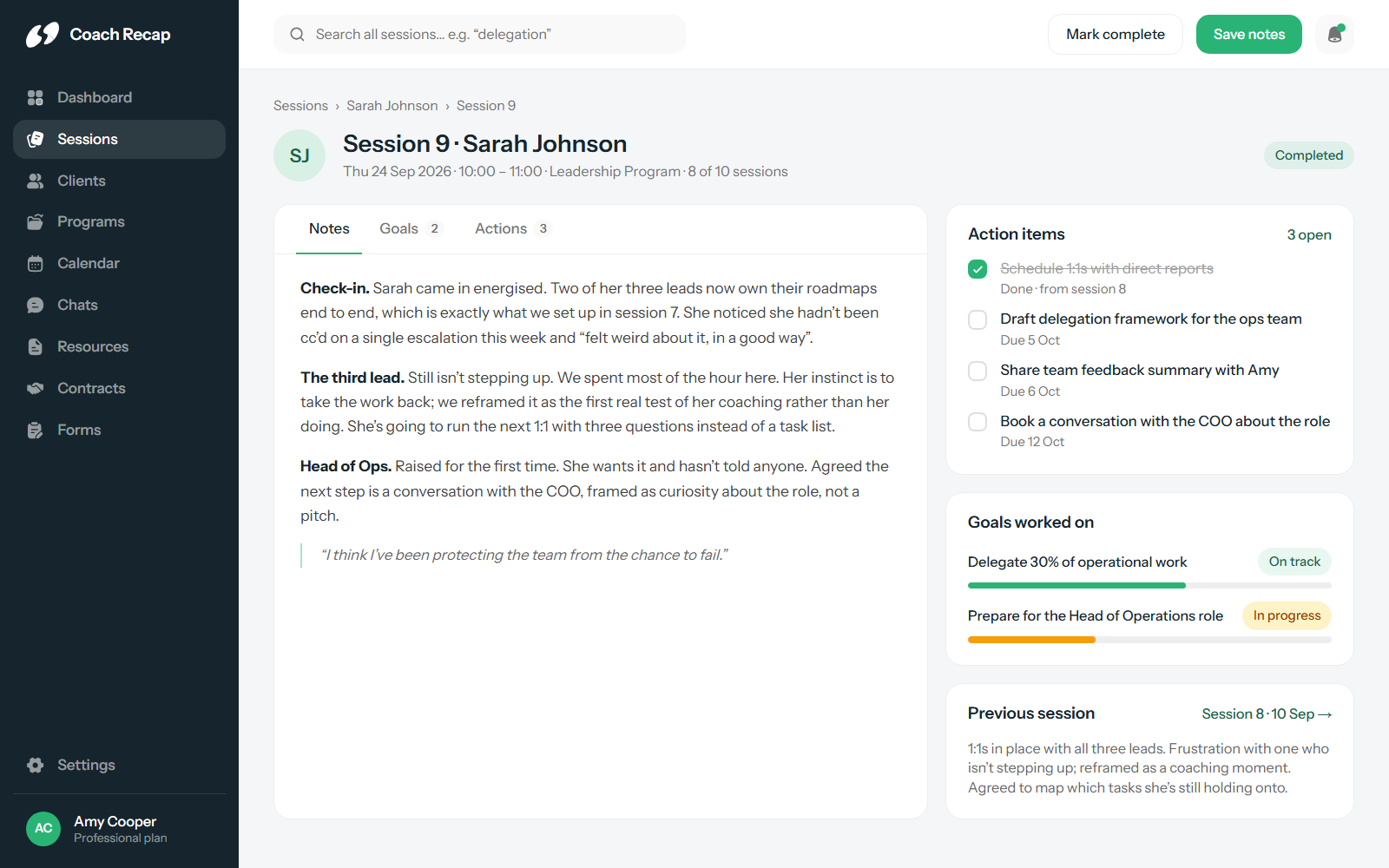
In Coach Recap, every session has its own page. Notes are written there, right after the session or during it. The page also holds the goals that session worked on and the action items that came out of it, so you can read one session on its own.
- One page per session with Notes, Goals and Actions
- Rich text notes
- Session history per client, in order
- Sessions created automatically from bookings
Action items with a follow-up
The most useful sentence in most session notes is the commitment: “Sarah will schedule 1:1s with her direct reports before we meet again.” In a text document that sentence is invisible by the next session. In Coach Recap it’s an action item with a checkbox. It shows on the client’s profile as pending, it’s the first thing you see when you open the next session, and it’s marked done when it’s done. Follow-up stops depending on your memory.
Full-text search across your whole practice
Search is where most note tools fall short. Coach Recap indexes every session note for every client. Type a word and you get every session that mentions it. That is how you find the session where a client first raised a theme, or check whether a pattern you’re noticing has come up before.
- Search across all sessions and all clients
- Find recurring themes for one client over time
- Prepare for a session in a couple of minutes
Goals that connect sessions to progress
A goal is set with the client and lives on their profile. Each session can link to the goals it worked on, so you can see what moved and when. When a client asks what has changed in three months, the answer is a list of sessions and the goals they moved, with the notes to back it up. See how goals fit the rest of the profile in client management.
Private, and with you
Session notes are professional records. They are visible only to you, hosted under GDPR, and never used for ads or sold. The iOS and Android apps mean you can write the note in the car park after the session and read the last one on the train before the next. Session notes are included on every plan, free plan included; see pricing.
Frequently asked questions
How are session notes organised in Coach Recap?
Each session has its own page with three tabs: Notes, Goals and Actions. Notes are free text. Goals link the session to the client’s longer-term goals. Actions are the commitments made in the session, each with a done/not-done status that carries over to the next session and to the client’s profile.
Can I search across all my notes?
Yes. Full-text search covers every session note for every client, so you can find the session where a client first mentioned a theme, or every time a particular topic came up, in seconds.
Are session notes private and secure?
Yes. Notes are visible only to you. Coach Recap is GDPR compliant, does not sell data and does not show ads. Your notes are your professional records and stay yours.
Can I write notes on my phone?
Yes. The iOS and Android apps include session notes, so you can add notes straight after a session from wherever you are and read a client’s history before the next one.
Your next session could be the first one with everything in one place.
Free for three clients. Five minutes to set up.
Start free